PluginsFeatures
Introducing multi-environment management in ReadyCMS
Learn how ReadyCMS’ Multi-environment manager separates development, testing, staging, and production so teams can build and test changes...

In e-commerce, every click counts. A commonplace, yes, but still very true. So it's important to track everything. Yet standard analytics tools often drop key click IDs when a visitor moves from an ad or an email to your site.
So what is the result? Misattribution, “direct/(none)” entries, and blind spots in your reports. Without the full picture of where traffic comes from, you can't optimize campaigns or measure true ROI.
Most analytics platforms rely solely on UTM parameters, but many ad networks and email services use proprietary click IDs rather than UTM tags.
When those IDs aren't preserved, sessions get lumped into direct traffic. This leaves you guessing which paid ad, social post, or email blast actually drove sales.
In short:
➕ Tip:Always compare the conversions your ad platform reports with those in your analytics tool. A big discrepancy signals dropped click-ids.
ReadyCMS automatically captures every UTM parameter you use, plus more than 20 popular click-ids out of the box.
That includes gclid (Google ads), fbclid (Facebook ads), Mailchimp's mc_cid, Brevo's sbx_cid, Drip's drip_id, and many others.
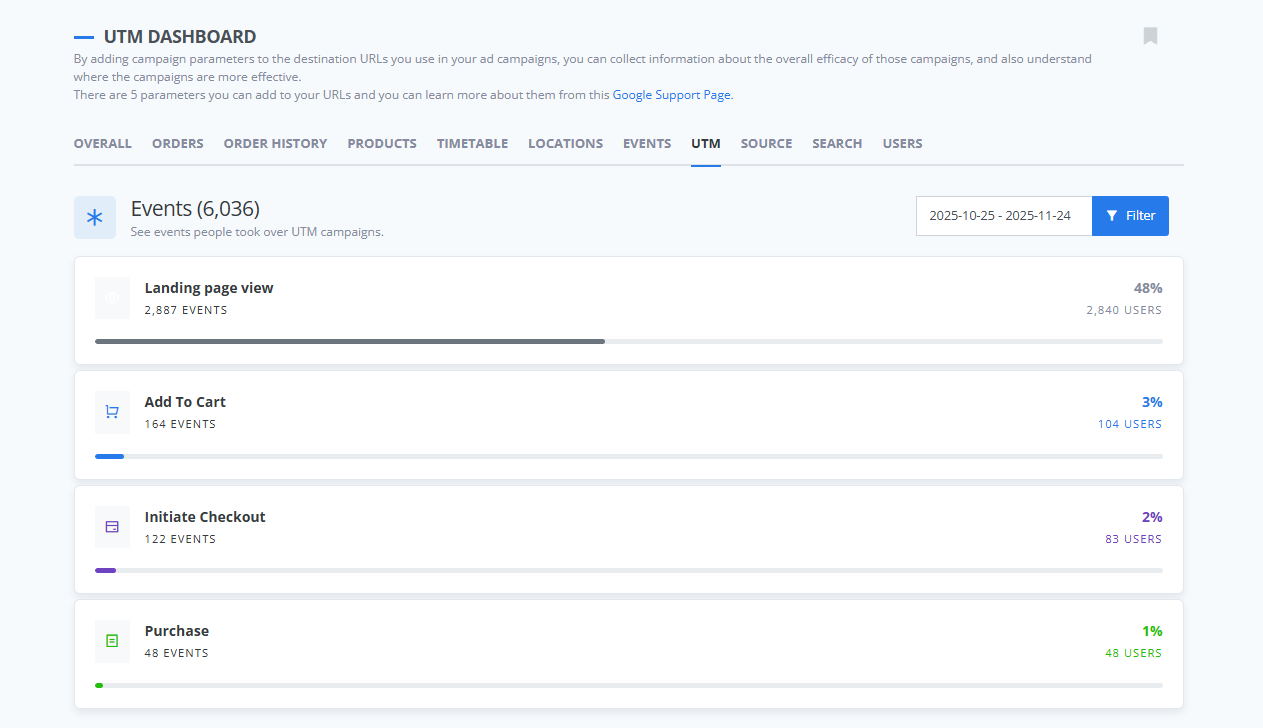
As soon as a visitor arrives, ReadyCMS stores these IDs in a cookie and your database. Now you never lose the original click source, even if they browse across several pages or clear cookies.
To simplify analysis, ReadyCMS normalizes all captured click-ids into UTM-style fields.
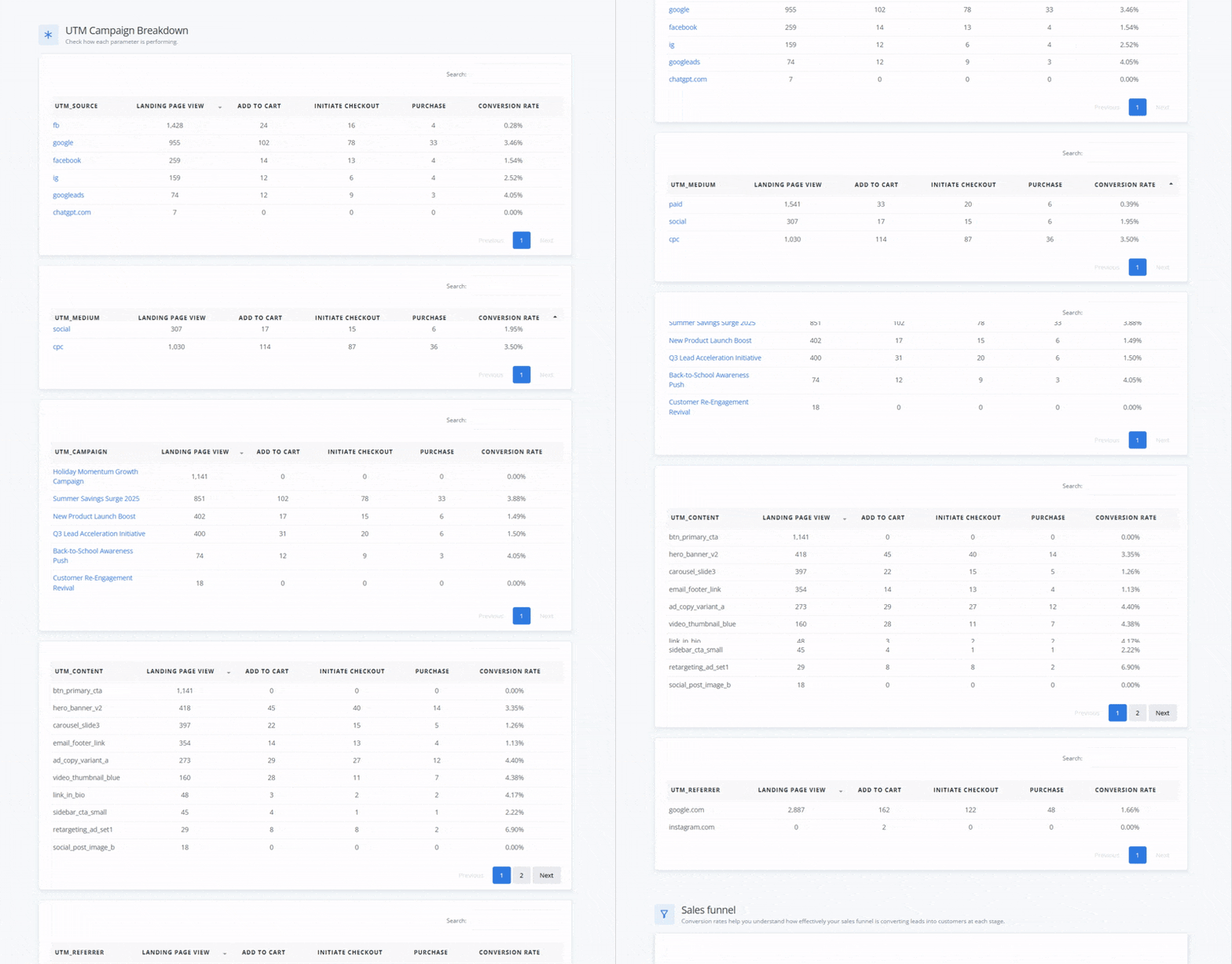
For example, a gclid value can populate utm_campaign, and fbclid values map into utm_source. This lets you use any analytics or business intelligence tool that reads UTM tags without any extra setup.
utm_campaignutm_sourceutm_mediumYour reports stay consistent, and historical data remains comparable across platforms.
Don't let another click slip through the cracks. Book a live demo and see how ReadyCMS can recover your missing traffic data.
Or, request a free tracking audit today and discover exactly how many clicks you've been wasting.
➕ Remember:
Every click matters, so let's make each one count!
Play the Audio version:
Small labels added to the end of a link (like ?utm_source=facebook) that help you see where visitors came from. They don’t change how a link works — they simply tell your analytics tool which channel, campaign, or ad brought a visitor to your site.
Unique tracking codes added automatically by platforms like Google, Facebook, Mailchimp, or Brevo when someone clicks their links.
Examples: gclid, fbclid, mc_cid, sbc_cid.
These help platforms better understand user behavior. And ReadyCMS captures them, so you don’t lose important data.
A click-ID used by Google Ads. It helps Google link a click to a campaign, keyword, and audience. ReadyCMS stores it so you always know when a visitor came from a Google ad.
A click-ID that Facebook/Meta adds when someone clicks a link from Facebook or Instagram. It improves attribution, especially across mobile and desktop.
Mailchimp’s click-ID. It identifies which email and which campaign sent traffic to your website.
Brevo’s (Sendinblue’s) click-ID, used to track clicks from email campaigns.
A way of understanding which channel, ad, or campaign is responsible for bringing a visitor or conversion. Good attribution helps you know what’s working — and what’s wasting budget.
The website or app a visitor came from before landing on your page. Example: if someone clicks a link on Twitter, the referrer is “twitter.com.”
A method for preserving the original click information even if the visitor browses multiple pages, closes the browser, or returns later. ReadyCMS does this automatically, so you never lose the original source.
A group of actions a user takes on your website within a limited time (usually 30 minutes). If tracking is weak, sessions can break or lose source data.
When a visit or sale gets credited to the wrong channel (or to “direct/none”). This makes reports inaccurate and hides your marketing's true performance.
Turning different forms of data into a single standard format.
Example: ReadyCMS converts click IDs into UTM-style fields so analytics tools can read them more easily.
Learn how ReadyCMS’ Multi-environment manager separates development, testing, staging, and production so teams can build and test changes...
Learn how to ask customers for reviews without sounding pushy, including timing tips, email examples, common mistakes, and ReadyCMS...
See how opens, clicks, open rate, and click rate reveal what works—and how ReadyCMS Mail Metrics turns every send into useful feedback.
Build a practical three-email abandoned cart sequence with recommended timings, subject line ideas, message examples, and ReadyCMS...
Learn why customers leave products in their carts, what you can improve during checkout, and how automated ReadyCMS emails can help...
ReadyCMS Assistants can simplify your website tasks, enhance SEO, and improve content quality with expert guidance.
Book a demo or talk with our team about putting these ideas to work.