MarketingeCommerce
How to get more reviews without nagging your customers
Learn how to ask customers for reviews without sounding pushy, including timing tips, email examples, common mistakes, and ReadyCMS...

A change that works perfectly in development can still cause problems on a live website.
A new integration may use the wrong credentials. A content model change may affect existing data. A frontend update may behave differently with real content. Even a small configuration mistake can become a production problem when there is nowhere else to test it first.
The ReadyCMS Multi-environment manager gives teams separate environments for development, testing, staging, and production.
Each environment keeps its own data, configuration, and API credentials, so teams can prepare and check work without automatically changing the live production setup.
The point of multiple environments is simple: unfinished work should not share the same space as your live business.
Production is where real customers, orders, content, and integrations are active. That makes it the worst place to discover a change doesn't work as expected.
Without another environment, teams may test configuration changes against live data, connect unfinished integrations to production systems, or make changes customers can see before they have been properly reviewed.
Separate environments create boundaries between those stages of work.
Developers can build against development data. QA can verify behavior separately. A staging setup can support final review. Production continues serving the live website while that work happens elsewhere.
The benefit is not that mistakes become impossible. It is that teams have somewhere to find and fix them before those mistakes reach production.
A common environment workflow uses four stages:
| Environment | Main purpose |
|---|---|
| Development | Build features, configure integrations, and make changes that are still in active development. |
| Testing | Verify functionality and find problems without using production as the test environment. |
| Staging | Review a production-like setup before approved changes reach the live website. |
| Production | Run the live website and the data, configuration, and connections used by real customers. |
A typical change may move conceptually from:
Development → Testing → Staging → Production
That does not mean every project needs all four environments or that ReadyCMS automatically deploys every change through this sequence. The environments give your team the separation needed to build its own release process around them.
Creating four environment names would not achieve much if they all changed the same underlying data.
In ReadyCMS, environments are stored separately. Each one has its own:
A change made in development, testing, or staging therefore does not automatically modify the production environment.
This matters especially for a headless CMS. A development frontend can connect to development credentials and data while the production frontend continues using its own production connection.
Developers can test API changes or integrations against a non-production environment instead of pointing unfinished work at the live database.
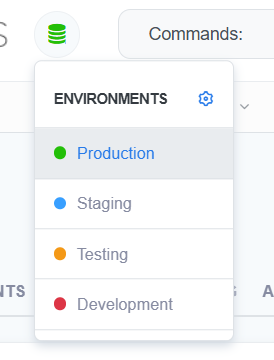
Each ReadyCMS environment keeps its data, configuration, and API credentials separate.
Environment management is often treated as a developer feature, but the separation also helps others involved in a release.
Consider a website update that includes both frontend changes and new CMS content.
The development team can build against a development environment. QA can verify the finished functionality using testing. Content and marketing teams can review the prepared result in staging. Customers continue using production during that process.
Everyone works from a version that matches their stage of work, instead of using the live website as a shared workspace for unfinished changes.
The same principle applies to integrations. A developer working on a payment provider, ERP connection, courier integration, or another external service can use the credentials and configuration intended for the non-production environment while the production connection remains separate.
Isolation doesn't mean every environment has to be configured manually from scratch.
ReadyCMS can copy one environment into another. For example, you can use an existing environment as the starting point for staging or testing instead of manually recreating its data and configuration.
This is useful when a team needs a realistic starting point for testing.
The environments remain separate after the copy. Changes made in the destination do not automatically change the source environment.
Copying is an intentional operation, not automatic synchronization. The destination is replaced with data from the selected source, so the source and destination should always be checked before confirming a copy.
We cover the complete copying process and its overwrite warning in the second part of this series.
Environment separation only helps if people can tell where they are working.
ReadyCMS marks non-production environments with a visual banner. That gives developers and administrators an immediate reminder when they are working in development, testing, or staging rather than on the live production environment.
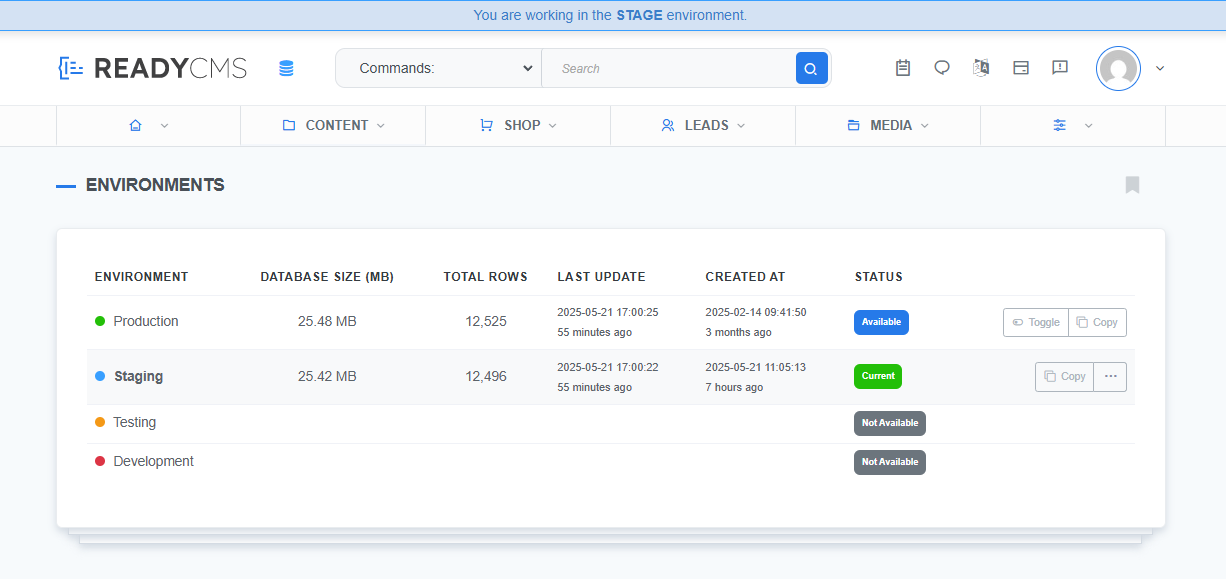 Non-production environments are clearly marked in the ReadyCMS Admin.
This is a small interface detail with a practical purpose: reducing the chance of someone making a production change while believing they are working somewhere else.
The value becomes clearer when a change touches several parts of a project.
Suppose a new homepage uses updated content, new components, and different API data.
When the frontend project is connected to matching ReadyCMS environments, the team can build against development data first. QA can verify the layout and functionality against testing. Stakeholders can review the prepared version against staging before the approved release reaches production.
The live site can continue using its production environment during that work.
A payment integration includes credentials, configuration, API responses, and checkout behavior that should be verified before real customers depend on it.
A non-production environment gives developers a place to configure the integration with the appropriate test credentials and inspect its behavior without changing the production configuration.
Once the team tests and approves the integration, it can update the production setup as part of the normal release process.
Environment separation is also useful when a change affects the CMS itself.
A team might need to adjust configuration, test an API consumer, prepare new content, or verify that another system still receives the data it expects.
Doing that work against a non-production environment gives the team a place to verify the change before applying the approved version to production.
Not necessarily.
A smaller project may only need production plus one additional environment for staging or development. A larger team with dedicated development and QA processes may benefit from the full development, testing, staging, and production structure.
The important part is not having the maximum number of environments. It is separating work that is still being built or reviewed from the setup your customers currently use.
ReadyCMS supports development, testing, staging, and production so the environment structure can grow with the workflow rather than forcing every project into the same process.
Multi-environment management gives your team boundaries between unfinished work and the live website.
ReadyCMS keeps environment data, configuration, and API credentials separate, lets you copy an existing environment when you need a realistic starting point, and clearly marks non-production environments inside the Admin.
Next, decide which environments your project needs and set them up correctly.
In part two, we walk through the process inside ReadyCMS: activating the plugin, creating environments, copying an existing setup, switching between them, and checking their status.
Continue to part two: How to set up development, testing, staging, and production in ReadyCMS →
1. What is a CMS environment?
A CMS environment is a separate instance used for a particular stage of work, such as development, testing, staging, or production. Keeping environments separate prevents unfinished work from automatically changing the live production setup.
2. What environments does ReadyCMS support?
The Multi-environment manager supports development, testing, staging, and production environments.
3. Does every project need development, testing, staging, and production?
No. The environment structure should match the way your team works. A smaller project may use production and one additional environment, while a larger development process may use all four.
4. Are ReadyCMS environments isolated?
Yes. Each environment has its own database, configuration, and API credentials. Changes in one environment do not automatically modify another.
5. Can I copy one ReadyCMS environment into another?
Yes. ReadyCMS can copy an existing environment into another environment. The destination is overwritten with data from the selected source, so check both environments carefully before confirming the copy.
6. Does ReadyCMS automatically move changes from development to production?
The environments provide separate places for each stage of work. Your team decides how approved changes move through its development and release process.
7. How can I tell whether I am working in production?
ReadyCMS includes an environment selector in the Admin and displays a visual banner in non-production environments, making it easier to distinguish development, testing, and staging from production.
Learn how to ask customers for reviews without sounding pushy, including timing tips, email examples, common mistakes, and ReadyCMS...
See how opens, clicks, open rate, and click rate reveal what works—and how ReadyCMS Mail Metrics turns every send into useful feedback.
Build a practical three-email abandoned cart sequence with recommended timings, subject line ideas, message examples, and ReadyCMS...
Learn why customers leave products in their carts, what you can improve during checkout, and how automated ReadyCMS emails can help...
ReadyCMS Assistants can simplify your website tasks, enhance SEO, and improve content quality with expert guidance.
Book a demo or talk with our team about putting these ideas to work.