PluginsFeatures
Introducing multi-environment management in ReadyCMS
Learn how ReadyCMS’ Multi-environment manager separates development, testing, staging, and production so teams can build and test changes...

Your store sends more than newsletters.
Order confirmations, shipping updates, password resets, abandoned cart reminders, review requests, and marketing campaigns all create interactions with customers after the email leaves ReadyCMS.
The question is what happens next.
Are recipients opening the message? Are they clicking the links inside it? Did engagement change after you rewrote a subject line or replaced a vague button with a more specific call to action?
The ReadyCMS Mail metrics plugin gives you those signals directly in your admin. It tracks opens, clicks, open rate, click rate, and engagement trends for emails sent through ReadyCMS.
The numbers do not tell you what to change automatically. They tell you where to look next.
Mail metrics focuses on four core engagement measurements:
| Metric | What it records | What it can help you investigate |
|---|---|---|
| Total opens | How many email opens were recorded | Whether recipients are viewing a message |
| Open rate | The proportion of sent emails recorded as opened | Subject line, sender information, timing, and general interest |
| Total clicks | How many link clicks were recorded | Whether recipients are interacting with links inside the email |
| Click rate | The proportion of emails that generated clicks | CTA clarity, content relevance, link placement, and the next action |
The distinction matters because an open and a click represent different stages of interaction.
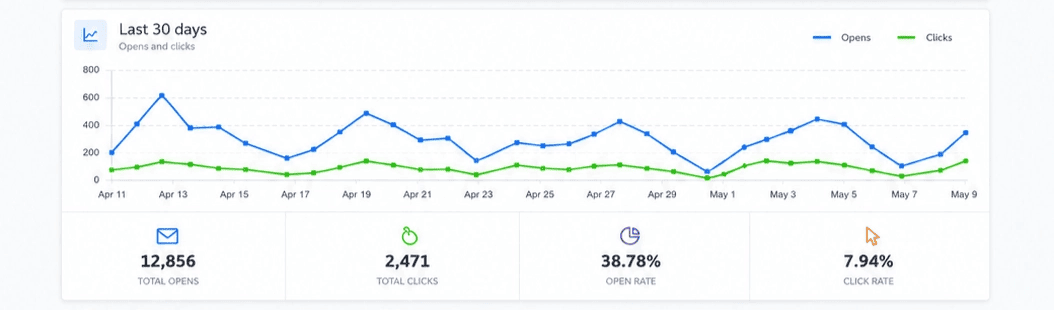 Mail Metrics brings the main email engagement signals into one ReadyCMS view.
An email open can be recorded when email content loads. That makes open rate useful for spotting patterns, but it should not be interpreted as a perfect count of people who read a message.
Email clients and privacy features can affect how opens are recorded.
Apple's Mail Privacy Protection, for example, is specifically designed to prevent senders from determining whether a recipient opened an email. Google also states that it does not track open rates itself and cannot verify the accuracy of open rates reported by third parties.
For that reason, treat open rate as a directional metric.
Instead of asking:
Did exactly 42.7% of recipients read this email?
ask questions such as:
Trends are usually more useful than treating one open-rate percentage as an exact measure of human attention.
A click is recorded when someone follows a tracked link inside the email.
That generally represents a more direct action than an open. The recipient has interacted with a specific button or link rather than simply loading the message.
Depending on the email, that action might be:
This makes click data particularly useful when the email has one clear next step.
For example, if a shipping notification is opened frequently but very few recipients click Track your order, that gives you a reason to inspect the placement, wording, or visibility of the tracking link.
It does not prove which one is responsible. It tells you what to test.
This distinction is easy to miss.
A click tells you that someone interacted with an email link. It doesn't automatically mean an abandoned cart became an order, a product was purchased, or a customer completed the action on the destination page.
Mail metrics is therefore best used to answer questions about the email itself:
For business outcomes, combine email engagement with the relevant ReadyCMS data for the workflow you are measuring.
For example, an abandoned cart email can have a healthy click rate while the returned customers still leave during checkout. In that situation, rewriting the email may not be the first problem to solve.
Marketing campaigns are only one part of the email your store sends.
ReadyCMS can also send transactional and automated messages such as:
These messages often have a specific purpose.
A shipping update should make the tracking information easy to find. A password reset email needs a clear route back to the account. An abandoned cart reminder should make it easy to reopen the saved cart.
That makes engagement data useful even when an email is not part of a marketing campaign.
ReadyCMS manages store email templates in the same platform. Mail Metrics adds the engagement view, so sending and measurement do not have to live in separate systems.
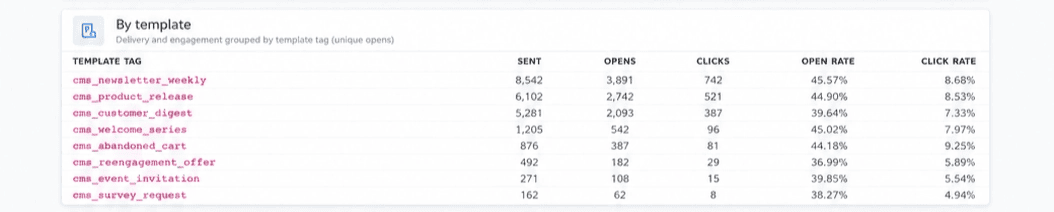 Compare engagement across different types of email sent through ReadyCMS.
Email analytics cannot tell you why something happened on its own.
It gives you evidence that helps you decide what to investigate.
| What you see | One possible explanation | What to test |
|---|---|---|
| Lower opens and lower clicks | Recipients may not be reaching or opening the message | Subject line, sender name, timing, audience |
| Higher opens but lower clicks | The email gets attention, but the next step may not be clear or relevant | CTA wording, content, layout, link placement |
| Clicks improve after a change | The new content or CTA may be easier to act on | Repeat the test on a similar email before generalizing |
| Opens fall suddenly across several emails | Something broader may have changed | Timing, sending pattern, audience, deliverability, recent template changes |
| One template consistently gets fewer clicks | Its purpose, content, or main action may need attention | Compare it with similar templates and test one change at a time |
Notice the wording: may.
A higher open rate does not prove that one subject line caused the difference. A lower click rate does not automatically mean the button copy is bad.
Use the data to form a hypothesis, then test it.
You do not need to redesign every email whenever a number changes.
Start with one variable that matches the problem you are seeing.
If recorded opens are weaker than expected, look at what the recipient sees before opening the message.
Compare:
Your order update
with something that explains the reason for the email:
Your order #1042 has shipped
The second version tells the customer what changed before they open the message.
 Compare similar sends after changing the subject line rather than judging one email in isolation.
If recipients open the email but rarely click its main link, check whether the button explains what happens next.
Instead of:
Click here
use the action itself:
Track your order
or:
Return to your cart
Specific button copy removes one small piece of uncertainty from the interaction.
A customer opening an order update or password reset usually has a specific reason for reading it.
If the important link appears after several paragraphs of secondary information, test moving it closer to the top of the email.
The goal is not simply to make the email shorter. It is to make the main task easier to find.
One send can be unusual for many reasons.
Mail metrics includes a 30-day engagement view showing opens and clicks over time. Use it to spot sustained changes rather than reacting to daily fluctuations.
If click activity improves after you update several related templates, that pattern gives you more information than one isolated result.
Mail metrics is a free ReadyCMS plugin and does not require a separate analytics platform.
After activating the plugin, open the Emails area in your ReadyCMS admin and go to the Mail metrics tab.
The dashboard includes:
ReadyCMS updates the data as it records new email activity.
Mail metrics covers emails sent through ReadyCMS, including campaign email and transactional messages such as order confirmations and password resets.
A single store may send very different messages during the same day.
One customer receives an order confirmation. Another gets a shipping update. Someone else receives an abandoned cart reminder, while a newsletter goes to a larger audience.
You shouldn't necessarily judge those emails against each other. They have different purposes.
But keeping their engagement data in the same ReadyCMS environment makes it easier to inspect the right email when something changes.
Send → measure → form a hypothesis → test → compare.
That feedback loop is more useful than changing an email simply because one percentage looks high or low.
Email metrics are most useful when they lead to a specific question.
If opens change, investigate what happens before the email is read. If clicks change, look at the message and the action you are asking the recipient to take. If engagement looks healthy but the business outcome does not, continue the investigation beyond the inbox.
Mail Metrics gives you the email side of that picture directly inside ReadyCMS.
Explore Mail metrics for ReadyCMS and use each send to decide what is worth testing next.
Email performance metrics record how recipients interact with messages. 'Mail metrics' focuses on opens, open rate, clicks, click rate, and engagement trends for email sent through ReadyCMS.
Open rate reflects emails recorded as opened. Click rate reflects interactions with tracked links inside those emails. Clicks generally represent a more direct interaction, while open data is more affected by email-client behavior and privacy features.
No. Email clients and privacy features can affect how opens are recorded. Apple's Mail Privacy Protection, for example, prevents senders from reliably determining whether a recipient opened a message. Use open rate as a directional metric and compare it with click activity and longer-term trends.
Not necessarily. A click shows that the recipient interacted with a link. What happens after that click depends on the destination and the email's purpose. Use the relevant store or commerce data when you need to measure purchases or other downstream outcomes.
'Mail metrics' tracks emails sent through ReadyCMS, including campaign emails and transactional messages such as order confirmations and password reset emails.
Mail Metrics currently displays email performance across a 30-day engagement view.
No. Activate the plugin in ReadyCMS, and email engagement tracking starts for outgoing ReadyCMS emails.
Yes. 'Mail metrics' is currently available as a free ReadyCMS plugin.
Learn how ReadyCMS’ Multi-environment manager separates development, testing, staging, and production so teams can build and test changes...
Learn how to ask customers for reviews without sounding pushy, including timing tips, email examples, common mistakes, and ReadyCMS...
Build a practical three-email abandoned cart sequence with recommended timings, subject line ideas, message examples, and ReadyCMS...
Learn why customers leave products in their carts, what you can improve during checkout, and how automated ReadyCMS emails can help...
ReadyCMS Assistants can simplify your website tasks, enhance SEO, and improve content quality with expert guidance.
Book a demo or talk with our team about putting these ideas to work.