PluginsFeatures
Introducing multi-environment management in ReadyCMS
Learn how ReadyCMS’ Multi-environment manager separates development, testing, staging, and production so teams can build and test changes...

Inventory mistakes happen. Stock disappears, numbers don't match, and sometimes no one remembers who made the last change, or why. That's where most systems leave you guessing.
But in ReadyCMS, we've added a feature that answers all those questions: stock change history.
If you've ever had to track down a stock issue, you know the drill:
Without a clear audit trail, you're stuck in detective mode. And in fast-moving teams, these gaps cost time and trust.
Our stock history tab records every single stock movement. No guessing, no assumptions, just a complete, timestamped activity trail.

Here's what it captures:
It's like having a security camera on your inventory.
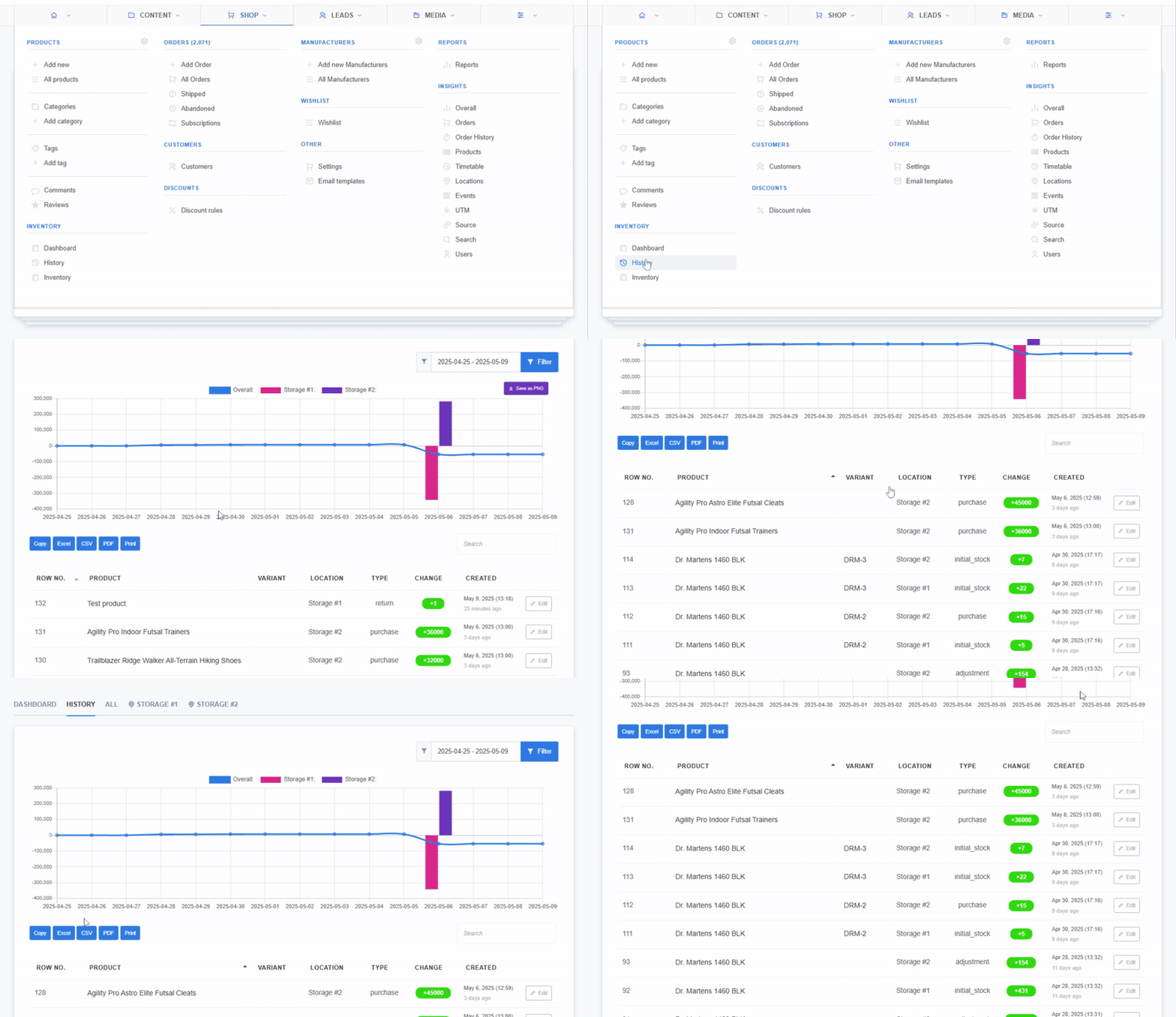
There are two main places where stock change history shows up:
View a complete chronological list of all stock changes across your entire business.
Inside each product's stock settings, you'll find a breakdown of changes specific to that product, across all or selected locations.
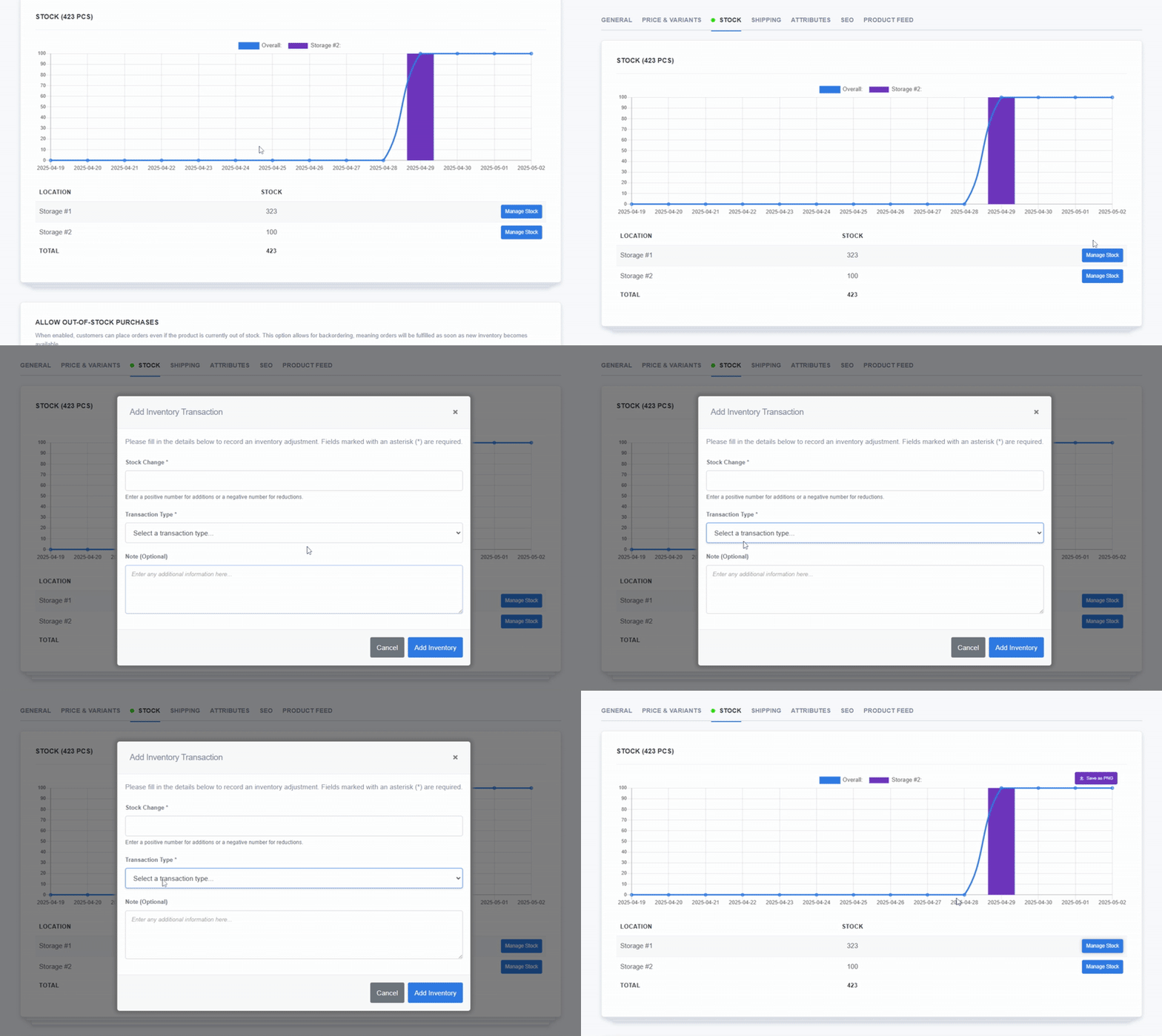
This isn't just about catching mistakes, it's about operating with confidence and precision.
better auditing:
Run regular inventory checks and match records easily. No need for guesswork.
team accountability:
See which team member made a change. Helps identify training gaps or workflow issues.
fewer errors:
People are more careful when they know their actions are tracked. The result? Cleaner data.
smarter decision-making:
Notice patterns, like frequent stockouts or overcorrections. This can inform your purchasing and planning.
Real-world scenario
Let's say your store suddenly shows zero stock on a popular product. Panic sets in.
You check the stock history and see that a return was processed, but instead of adding 1 back to stock, someone accidentally removed 1. Now you know exactly what happened—and how to fix it.
Without that log, you'd still be searching for answers.
Stock change history might not seem like a headline feature, but it's a game-changer for smart operations.
It clarifies confusion, builds trust in your data, and helps your team stay sharp.
Like everything else in ReadyCMS, it's just a few clicks away. No complex setup or separate tools are needed.
Learn how ReadyCMS’ Multi-environment manager separates development, testing, staging, and production so teams can build and test changes...
Learn how to ask customers for reviews without sounding pushy, including timing tips, email examples, common mistakes, and ReadyCMS...
See how opens, clicks, open rate, and click rate reveal what works—and how ReadyCMS Mail Metrics turns every send into useful feedback.
Build a practical three-email abandoned cart sequence with recommended timings, subject line ideas, message examples, and ReadyCMS...
Learn why customers leave products in their carts, what you can improve during checkout, and how automated ReadyCMS emails can help...
ReadyCMS Assistants can simplify your website tasks, enhance SEO, and improve content quality with expert guidance.
Book a demo or talk with our team about putting these ideas to work.