PluginsFeatures
Introducing multi-environment management in ReadyCMS
Learn how ReadyCMS’ Multi-environment manager separates development, testing, staging, and production so teams can build and test changes...

When people think about improving an e-commerce business, they usually focus on things like better design, stronger marketing, more traffic, or higher conversion rates. Those things matter, of course. But as any growing business learns, much of the time is not lost on strategy. It is lost in operations.
It disappears in repetitive admin work. In manual updates. In fixing the same issue one product at a time. In editing statuses, fields, images, or user data record by record. In all the small tasks that seem manageable on their own, but slowly become a major burden as the business grows.
That is exactly why the Tools area in ReadyCMS matters.
With the latest update, we expanded this part of the platform with 20 new tools, designed to make everyday work faster, more structured, and easier to manage at scale.
But the real story is not just the number. The real value lies in what these tools represent: a stronger operational layer within ReadyCMS, built to reduce manual work and help teams stay in control.
A modern CMS should do more than help you manage content, products, and pages. It should also help your team work with data efficiently.
That means more than storing information in the right place. It means giving users practical ways to update, maintain, organize, and improve that information without wasting time on repetitive steps. It means making large-scale changes possible without turning them into manual, risky, or exhausting tasks.
This is where tools become a real platform advantage.
In ReadyCMS, Tools are not just extra utilities added for convenience. They are part of a bigger goal: helping clients run their businesses with greater speed, consistency, and less friction in everyday operations.
The latest ReadyCMS release adds 20 new tools across several key areas, including products, orders, manufacturers, users, subscriptions, and content.
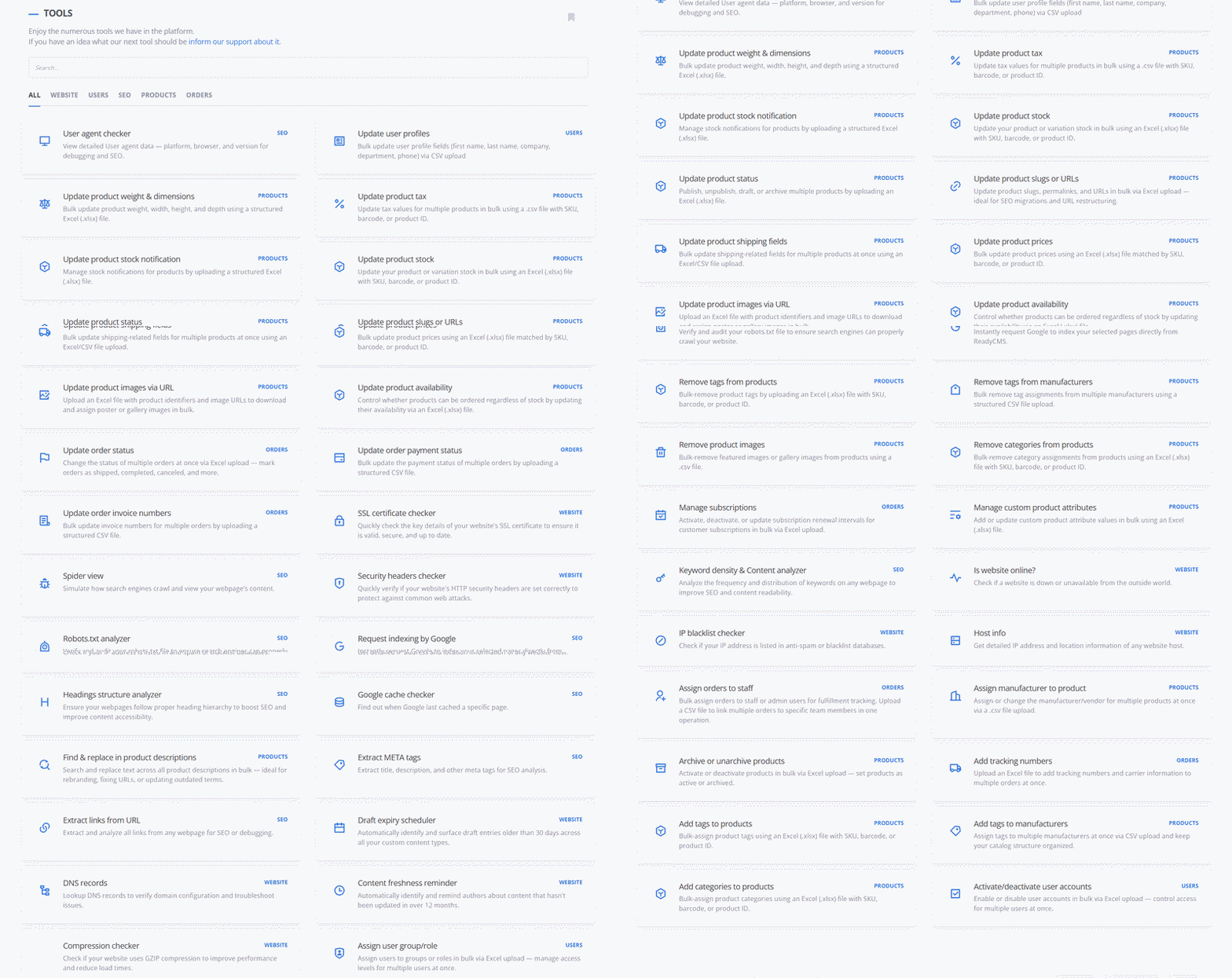
On paper, that sounds like a feature expansion. In practice, it is much more than that.
Each new tool is another way to shorten tasks that used to take much longer. Another way to reduce manual repetition. Another way to make bulk actions safer and easier to validate. Another way to help teams work more efficiently without relying on complicated workarounds or external processes.
That is the real goal behind this update. Not just adding more options, but improving the quality of daily work inside the CMS.
Product data is one of the areas where operational complexity tends to grow the fastest. The larger the catalog becomes, the more difficult it is to keep everything accurate, complete, and up to date.
Even simple changes can become time-consuming when they need to be repeated across many products. Updating general fields, changing URLs, adjusting dimensions, editing tax settings, assigning images, or managing attributes manually is not just slow. It also increases the chance of mistakes and inconsistencies.
That is why this Tools update puts a strong focus on product operations.
With the new additions, ReadyCMS makes it easier to handle product updates in bulk, whether the goal is to archive or unarchive products, update slugs and URLs, assign images by URL, manage custom attributes, edit shipping-related fields, or update weight and dimensions across multiple records.
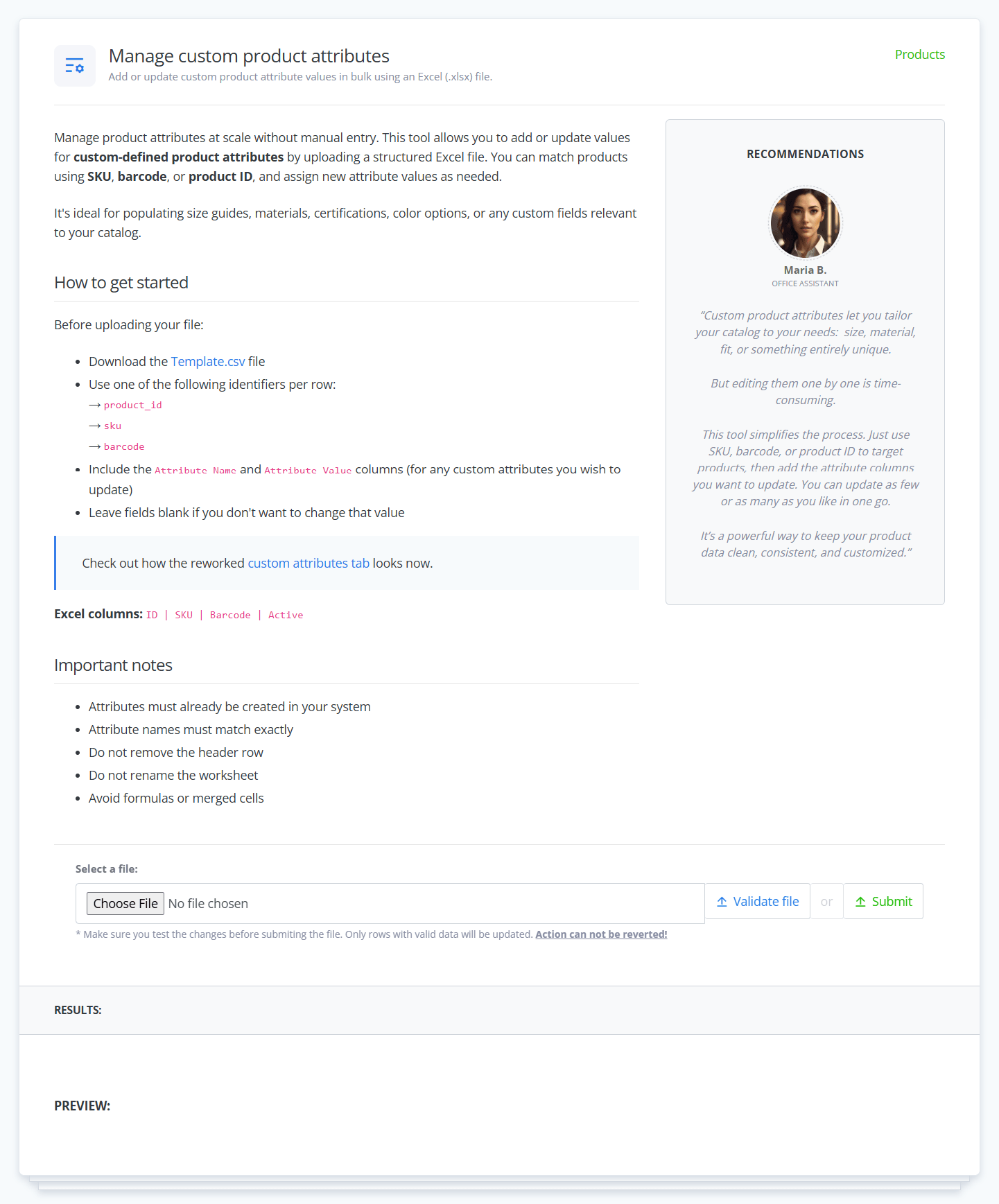
Example of a tool page with clear instructions for use.
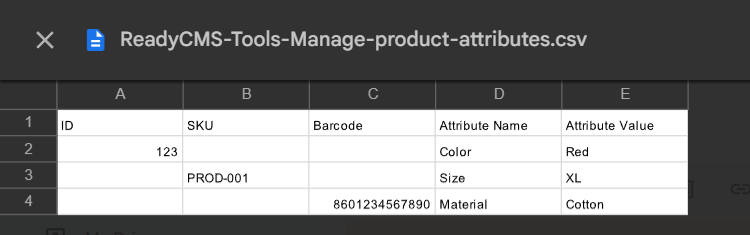
CSV template for updating product attributes in ReadyCMS by ID, SKU, or barcode, with attribute names and values organized in separate columns.
This matters because product maintenance is not occasional work. For many businesses, it is daily work. And when the platform makes those tasks easier, the effect is immediate. Teams spend less time fighting repetition and more time focusing on accuracy, speed, and growth.
The work does not stop once an order is placed. In many ways, that is where operational pressure really begins.
Statuses need to be updated. Payment states need to be corrected or synchronized. Invoice numbers have to be assigned. Tracking details need to be added. Internal responsibilities need to be clear. And when those tasks are handled one by one, the back office quickly becomes a bottleneck.
That is why this update also strengthens order-related tools.
ReadyCMS now gives teams more ways to update order data in bulk, including status changes, payment status updates, invoice number assignment, staff assignment, and tracking number management. These are the kinds of tasks that may seem straightforward, but when they pile up across large volumes of orders, they create real operational drag.
By making these actions easier to manage in bulk, ReadyCMS helps teams keep fulfillment workflows cleaner, faster, and more organized. That kind of improvement may not always be flashy, but it has a direct effect on everyday efficiency.
Operational efficiency is not only about products and orders. It also applies to the administrative structure around the business.
User account management, role assignment, subscription updates, and internal organization all require time and consistency. As businesses grow, those tasks become more frequent and more important. Teams need practical ways to activate or deactivate users, update user information, assign roles, and manage subscription changes without turning every update into a manual process.
This is another area where the expanded Tools section adds real value.
By supporting bulk actions for users and subscriptions, ReadyCMS helps reduce the workload of platform administration. That is important because a good CMS should not only help manage the customer-facing side of the business. It should also simplify the internal work that keeps the system running smoothly.
One of the highest hidden costs in manual work is not just the time it takes. It is the number of avoidable errors it entails.
When teams repeat the same action across many records, small mistakes become much more likely. A wrong field is edited. A value is skipped. A status is missed. An image is uploaded incorrectly. A user is assigned the wrong setting. And once those issues appear at scale, correcting them takes even more time.
That is why well-designed bulk tools matter so much.
The value is not only in doing more work faster. It is in doing that work more structured and controlled. Validation, consistent input formats, and clearly defined workflows all help reduce the risk associated with repetitive admin tasks.
In other words, better tools save time and improve confidence in the work being done.
A single update may take only a few seconds or a few minutes. But scale changes everything.
One manual action repeated across 50 products becomes a task. Repeated across 500 products, it becomes a problem. Repeated every week, it becomes a cost to the business.
This is one of the biggest reasons why operational tools are so valuable. They address work that often feels too small to discuss strategically, yet too frequent to ignore in practice.
That is what makes the Tools area in ReadyCMS so important. It turns repeated admin work into more manageable workflows. It helps teams respond faster to changes. It reduces wasted time. And it allows operations to stay cleaner as the business grows.
For clients, this brings obvious benefits. Faster updates. Better control. Less frustration. More room for teams to focus on work that actually moves the business forward.
From the client's perspective, the value is clear. Better tools mean a more useful platform. It means fewer hours spent on manual admin work. It means better support for bulk changes, large datasets, and everyday operational maintenance. It means less friction inside teams that already have enough to manage.
But this kind of update is also important for ReadyCMS itself.
A CMS becomes stronger when it supports not only content and storefront management but also the real operational processes that happen behind the scenes. That is where platform maturity shows. Not only in visible features but also in practical systems that help businesses handle daily work more effectively.
This is one of the reasons we see Tools as an important part of the ReadyCMS experience. They make the platform more useful, more scalable, and more aligned with the real needs of growing businesses.
The latest update is a major expansion, but it is not the end of the story.
We plan to continue developing new tools, improving existing ones, and expanding the kinds of tasks clients can manage more easily inside ReadyCMS. Our goal is simple: to keep making the platform more useful for real business operations, not only in theory but in the everyday work our clients do.
That means building features that save time, reduce friction, and help teams stay in control as their business evolves.
Because growth is not only about doing more. It is also about making the work behind that growth easier to handle.
Some of the best platform improvements are not always the loudest ones. Sometimes they are the ones that quietly save hours of work, reduce repetitive effort, improve data consistency, and help teams move faster without added stress.
That is exactly what the ReadyCMS Tools area is becoming.
And with 20 new additions in this release, there are now even more reasons to take a closer look.
Learn how ReadyCMS’ Multi-environment manager separates development, testing, staging, and production so teams can build and test changes...
Learn how to ask customers for reviews without sounding pushy, including timing tips, email examples, common mistakes, and ReadyCMS...
See how opens, clicks, open rate, and click rate reveal what works—and how ReadyCMS Mail Metrics turns every send into useful feedback.
Build a practical three-email abandoned cart sequence with recommended timings, subject line ideas, message examples, and ReadyCMS...
Learn why customers leave products in their carts, what you can improve during checkout, and how automated ReadyCMS emails can help...
ReadyCMS Assistants can simplify your website tasks, enhance SEO, and improve content quality with expert guidance.
Book a demo or talk with our team about putting these ideas to work.