PluginsFeatures
Introducing multi-environment management in ReadyCMS
Learn how ReadyCMS’ Multi-environment manager separates development, testing, staging, and production so teams can build and test changes...

Modern e-commerce revolves around providing an exceptional user experience. It is often crucial for the success of your online store.
ReadyCMS offers a powerful Search Queries Dashboard that can help you gain valuable insights into your customers' behavior and preferences.
Here are five simple tips to make the most out of this feature and improve your user experience.
Watch our CEO explain these tips in this brief video:
One of the most valuable insights you can gain from the Search Queries Dashboard is identifying frequent searches that yield no results. Imagine a customer visiting your site, searching for a product, and finding nothing—it's a frustrating experience that can lead to lost sales.
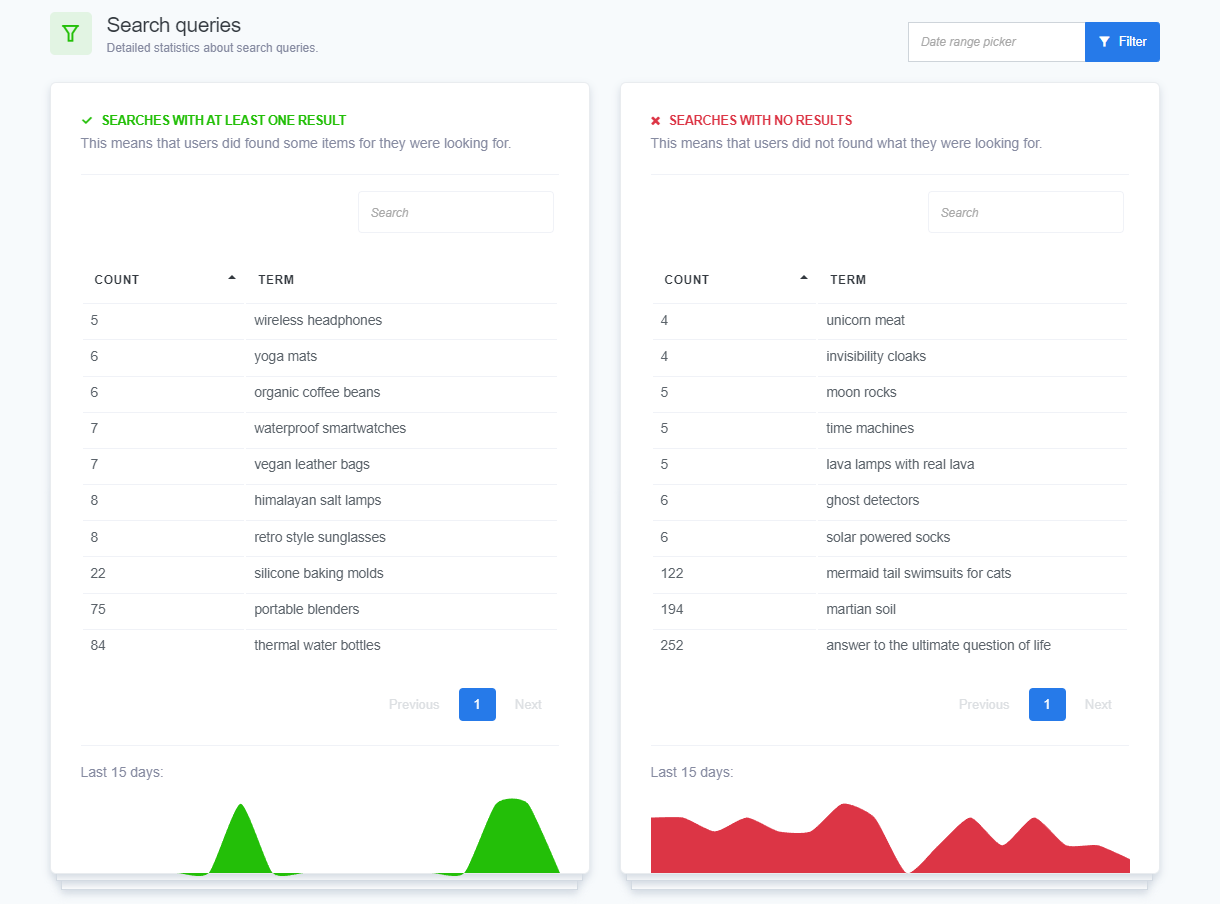
When users aren't finding what they need, it signals a gap in your product offerings or descriptions. This is a goldmine of information that can help you improve. Here are some practical steps you can take:
📈 Benefits of addressing search gaps
By addressing these gaps, you can better meet customer needs, leading to increased satisfaction and higher sales. Not only will this improve your site's usability, but it will also help retain customers by ensuring they find what they need.
Make it a habit to regularly check the Search Queries Dashboard and adjust your product listings accordingly. This proactive approach will keep your inventory aligned with customer expectations and help you stay competitive.
Once you've analyzed the frequent searches, you should work on your SEO. Optimizing your product titles and descriptions is not just about SEO—it's about creating a seamless and intuitive shopping experience for your users. Effective product titles and descriptions help users quickly find what they're looking for, enhancing their overall experience on your site.
📈 Benefits of optimized titles and descriptions
Optimizing your product titles and descriptions offers several benefits—whether it’s improving user experience by allowing them to quickly find what they need, or getting higher search engine rankings through well-optimized content. Clear and compelling descriptions can persuade users to make a purchase leading to increased sales. And when users find relevant content quickly, they are more likely to stay on your site longer, reducing bounce rates.
Regularly review and update your product titles and descriptions to ensure they remain relevant and effective. Use insights from your Search Queries Dashboard to refine your keywords and better match user search intent.
Staying ahead of the curve is essential in e-commerce, and monitoring trending search terms on your Search Queries Dashboard can help you do just that. By paying attention to what your users are frequently searching for, you can create or update content to match their interests and needs. For instance, if you notice an uptick in searches for "sustainable fashion," consider adding more eco-friendly products to your inventory or creating blog content around this topic.
This proactive approach helps you keep your inventory relevant and attract more traffic to your site. Additionally, by addressing trending searches, you can capitalize on seasonal trends and timely topics, ensuring your offerings are always in demand.
📈 Benefits of monitoring trending search terms
By staying on top of current trends, you ensure that your product offerings align with customer interests, which can lead to increased sales and customer loyalty. It also allows you to quickly adapt to market changes, providing a competitive edge. Furthermore, creating content that matches trending searches can improve your SEO, driving more organic traffic to your site.
Make it a habit to regularly review trending search data and adjust your inventory and content strategy accordingly. Set regular alerts for emerging search trends, update your strategy continuously, collaborate with your team to stay responsive, track performance, and remain agile to adapt to new trends. This way, you can ensure that your e-commerce site remains dynamic, relevant, and customer-focused.
Your site's navigation plays a crucial role in user experience. Use the search data from your Search Queries Dashboard to identify frequently searched categories and make these categories more accessible in your menus. For instance, if many users search for "home office furniture," consider adding a dedicated menu item for this category.
Simplifying your menu structure and highlighting popular categories can lead to a smoother shopping experience, encouraging users to spend more time on your site and increasing the likelihood of conversions.
📈 Benefits of improving site navigation
A well-organized navigation structure enhances user experience by making it easier for users to find what they're looking for, reducing frustration. Simplified navigation can reduce bounce rates, as users are more likely to stay on your site if they can quickly find what they need. This also leads to increased engagement, as users are more likely to explore additional products and pages. When users can easily locate products, the likelihood of completing a purchase increases, leading to higher conversion rates. Clear navigation can also improve your site's SEO by making it easier for search engines to index your pages.
Conduct regular audits of your site navigation to ensure it aligns with user search behavior and needs. Use A/B testing to evaluate the impact of navigation changes on user behavior and site performance. Collect feedback from users to identify navigation pain points and areas for improvement, and work with your web design team to implement navigation improvements seamlessly. Track key metrics such as bounce rates, time on site, and conversion rates to measure the effectiveness of navigation changes.
By regularly updating your site navigation based on search data, you can enhance user satisfaction, increase engagement, and ultimately drive more sales.
Integrating insights from your Search Queries Dashboard into your SEO strategy is crucial for driving organic traffic and improving user experience. Use keywords from your search data to refine your meta titles and descriptions, ensuring they are aligned with what users are searching for. Enhance your image alt texts with relevant keywords to improve image search rankings. Regularly update your blog posts, product pages, and other content to include trending keywords and phrases. Improve internal linking by creating links to high-traffic pages, which not only aids navigation but also boosts SEO. Additionally, leverage long-tail keywords that match specific user queries for better targeting and improved search engine visibility.
📈 Benefits of SEO integration
By aligning your SEO strategy with search data, you can attract more visitors from search engines and improve your site's ranking on search engine results pages. Optimized meta tags, alt texts, and content lead to a more user-friendly site, making it easier for visitors to find what they need. Enhanced SEO practices increase your site's visibility, making it more likely that potential customers will discover your products. This higher visibility and better user experience can lead to more conversions and sales.
Continuously monitor your Search Queries Dashboard to stay updated on user search behavior. Regularly refine your meta tags, alt texts, and on-page content based on the latest search data. Develop blog posts, guides, and other content that address trending search queries and keywords. Use SEO analytics tools to measure the impact of your updates and make data-driven adjustments. Stay educated on the latest SEO best practices and trends to ensure your strategy remains effective and up-to-date. By integrating these insights into your SEO strategy, you can boost your site's visibility, attract more traffic, and ultimately drive more sales.
Play the Audio version of this article:
More about this subject:
Learn how ReadyCMS’ Multi-environment manager separates development, testing, staging, and production so teams can build and test changes...
Learn how to ask customers for reviews without sounding pushy, including timing tips, email examples, common mistakes, and ReadyCMS...
See how opens, clicks, open rate, and click rate reveal what works—and how ReadyCMS Mail Metrics turns every send into useful feedback.
Build a practical three-email abandoned cart sequence with recommended timings, subject line ideas, message examples, and ReadyCMS...
Learn why customers leave products in their carts, what you can improve during checkout, and how automated ReadyCMS emails can help...
ReadyCMS Assistants can simplify your website tasks, enhance SEO, and improve content quality with expert guidance.
Book a demo or talk with our team about putting these ideas to work.