PluginsFeatures
Introducing multi-environment management in ReadyCMS
Learn how ReadyCMS’ Multi-environment manager separates development, testing, staging, and production so teams can build and test changes...

An out-of-stock product does not always look like a problem.
The product page can still be live. It can still appear in a category. A campaign can still send traffic to it. Unless someone checks the inventory, the issue may sit quietly in the background.
The same applies to duplicate SKUs, incomplete product data, stalled orders, expiring credentials, pricing problems, or an SSL certificate approaching expiry.
Nothing has to crash for a store to need attention.
That is the problem ReadyCMS Recommendations is designed to solve.
Every week, ReadyCMS runs 50 automated checks across the store and surfaces only the issues that meet the conditions for attention.
Recommendations originally launched in ReadyCMS 3.0.59 with 44 checks. Since then, we have expanded the system to 50 checks covering commerce, operations, product quality, and security.
The checks run automatically every Friday, so the next weekly review is ready without someone having to build or remember a manual maintenance checklist.
Reports are useful when you already know what you want to investigate.
You can open an order report when you want to review fulfillment. You can check inventory when stock is the question. You can inspect product data when you suspect a catalog problem.
The harder problem is noticing something that nobody was actively looking for.
A duplicate SKU may exist for weeks without causing an obvious failure. An order may remain stalled until the customer asks about it. A product can be published without an image and stay that way because everyone assumes someone else has already checked it.
Recommendations turns that maintenance work into a scheduled audit.
Instead of asking the user to know every condition worth checking, ReadyCMS evaluates those conditions automatically and creates a recommendation when something crosses the relevant threshold.
No recommendation is also a result. If a check passes, there is no reason to create another card for someone to review.
ReadyCMS runs the Recommendations checks automatically every Friday.
Each check looks for a specific condition. When that condition requires attention, ReadyCMS creates a card on the Recommendations board.
The card identifies the issue, shows the relevant products, orders, accounts, or settings where appropriate, and provides a direct path to the part of the Admin where the issue can be reviewed.
The workflow is deliberately simple:
You do not need to configure the audit before it starts working. Recommendations runs against the data already available in the store.
The current Recommendations system includes 50 checks divided into four groups:
| Area | Checks | What they cover |
|---|---|---|
| Commerce | 17 | Revenue signals, retention, average order value, discounts, cart recovery, and other commercial conditions |
| Operations | 14 | Order flow, fulfillment, inventory health, configuration, and data integrity |
| Product quality | 12 | Catalog completeness, pricing, product titles, images, and SEO readiness |
| Security & system | 7 | Access, credentials, email delivery, SSL, and other system-level conditions |
The point is not to create a longer report. Each group covers problems that can otherwise be easy to overlook during normal store management.
Commerce checks look for conditions connected to sales and customer behavior.
For example, a store may have products that remain visible while they are unavailable to buy. ReadyCMS can flag inventory conditions so the team can decide whether the product should be restocked, hidden, updated, or removed from an active campaign.
Other commerce checks can look at areas such as cart recovery, customer retention, discount health, and changes in commercial performance.
The recommendation tells the team what deserves review. It does not automatically decide the business response.
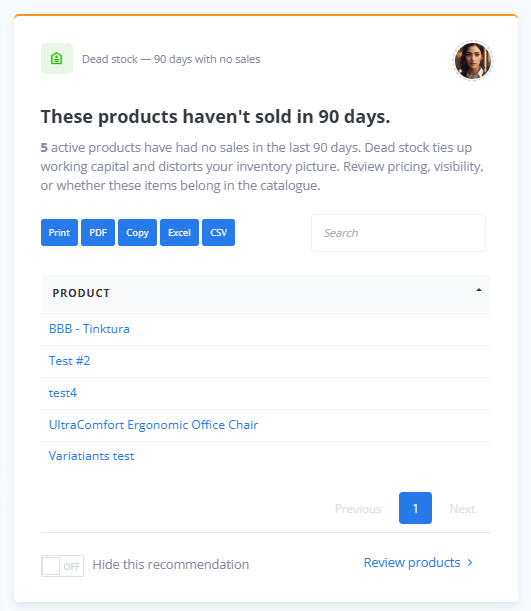
Commerce checks surface conditions that can affect orders, customers, or revenue.
Operational problems do not always produce an immediate customer-facing error.
An order can remain in the wrong state. Inventory data can become inconsistent. An important configuration step can be missing.
The operations checks look for these kinds of conditions across the store so the team does not have to inspect every area manually each week.
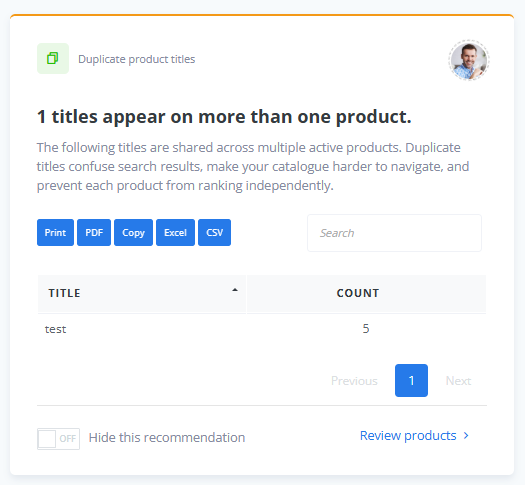
Operations checks cover order flow, fulfillment, inventory, configuration, and data integrity.
A product catalog is operational data, not only content.
Product identifiers, prices, titles, images, descriptions, and other attributes can affect search, feeds, inventory, recommendations, campaigns, and integrations.
A duplicate SKU is a simple example. Two products using the same identifier can create ambiguity anywhere another system expects that identifier to be unique.
Other checks can surface missing images, incomplete product information, pricing issues, or SEO-related gaps.
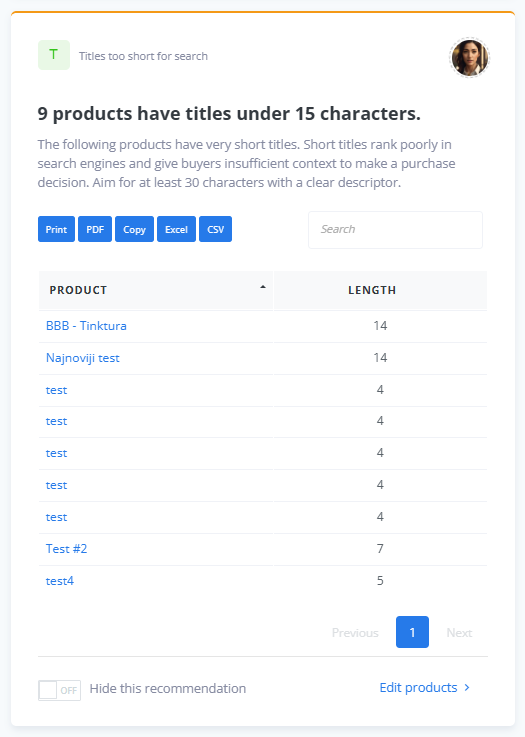
Product quality checks look for problems in the catalog before someone has to find them manually.
Some maintenance tasks are important precisely because nobody should have to remember them manually.
Recommendations includes checks related to access controls, credentials, email delivery, SSL, and other system conditions.
An SSL certificate approaching expiry is a good example. The certificate may work normally today, but it becomes a real problem if nobody notices before the expiry date.
ReadyCMS can surface that condition in advance rather than waiting for the failure itself.
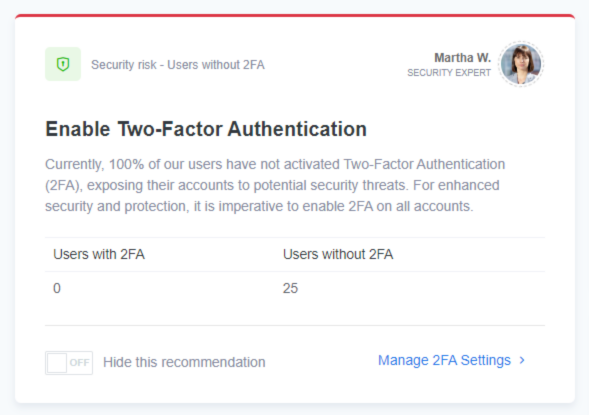
Security and system checks cover access, credentials, email delivery, SSL, and related maintenance.
A useful audit should distinguish between a condition that exists and one that deserves attention.
That is why Recommendations checks use thresholds.
For example, a small amount of cart abandonment is normal. A much larger change may justify a closer look. The system should not create an alert simply because the metric is not zero.
The same principle applies to other areas of the store.
Recommendations is designed to surface a card when the check reaches the condition defined as meaningful, not whenever the underlying data exists.
This keeps the weekly review focused on exceptions, rather than turning it into another dashboard full of normal activity.
The Recommendations area includes access to the full checks catalog.
This matters because an automated audit should not be a black box.
Store teams can review the areas ReadyCMS checks and understand what the weekly audit is looking for.
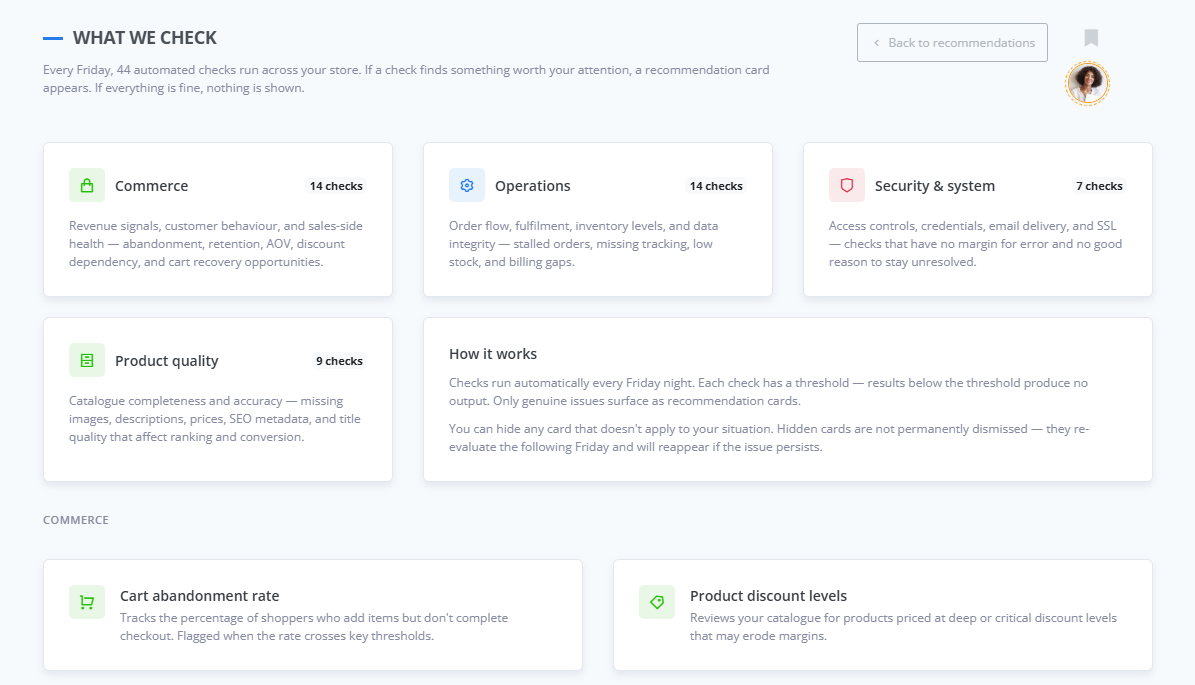 The checks catalog shows what ReadyCMS evaluates during the weekly audit.
The catalog can also work as a practical reference for different teams.
Store owners can use it to understand what routine maintenance ReadyCMS covers. Agencies can use it when reviewing or handing over client stores. Internal teams can refer to a named check instead of describing a vague problem.
Recommendations does not need AI to decide whether every store condition is healthy.
Most of the 50 checks are data-driven.
ReadyCMS can determine whether a product has an image, whether an order has been waiting too long, whether an SSL certificate is approaching expiry, or whether pricing data matches a defined condition directly from store data.
One current check uses AI to review product titles for misleading or clickbait-style wording.
Keeping that distinction clear matters. Use AI where language needs interpretation; keep straightforward store conditions as deterministic checks.
Hiding a recommendation doesn't permanently remove it from the system.
The underlying check runs again during the next weekly audit.
If the issue has been resolved, there is nothing to show. If the same condition still meets the threshold, ReadyCMS can surface it again.
This lets users clear the current board without permanently disabling the maintenance check behind it.
A maintenance system should not invent work just to prove that it is running.
If all 50 checks pass, the Recommendations page shows a clean state instead of filling the board with “everything is fine” cards.
ReadyCMS also tracks consecutive clean weeks as a streak.
That provides simple confirmation that the audit ran and didn't find anything that crossed its thresholds.
ReadyCMS has another feature that can surface issues while users work: Assistants.
The two features are related, but not the same.
| Recommendations | Assistants |
|---|---|
| Runs as a scheduled weekly audit | Works contextually while the user is in the Admin |
| Reviews 50 store conditions | Surfaces page-specific observations |
| Creates a board of issues to review | Shows one relevant message at a time |
| Useful for a regular maintenance routine | Useful when something matters to the task being performed now |
A weekly audit may flag a catalog issue before anyone opens that product. An Assistant can surface relevant context later while someone is already working in that area.
One provides the scheduled review. The other provides the real-time nudge.
The useful outcome of Recommendations is not the audit itself.
It is the list of things that actually deserve review afterward.
Every Friday, ReadyCMS runs the checks. The next time the team opens Recommendations, the board contains the issues that passed their thresholds, with affected items and direct links where action is available.
If everything is healthy, there is no artificial list to work through.
That changes store maintenance from:
“What should we remember to check this week?”
to:
“What did ReadyCMS find that actually needs our attention?”
Quiet store problems will always exist.
A product can lose its image. Inventory can run low. An order can remain stuck. Pricing can become inconsistent. A credential or certificate can approach a deadline.
The goal of Recommendations is not to claim that every problem can be diagnosed automatically.
It is to run the routine checks consistently, surface the exceptions, and give the team a direct place to start.
Explore ReadyCMS Recommendations and see all 50 weekly checks →
Learn how ReadyCMS’ Multi-environment manager separates development, testing, staging, and production so teams can build and test changes...
The work that slows teams down is not always the work they notice first.
Make every order clearer with item-specific notes. Whether it's custom messages or B2B labeling, this ReadyCMS plugin adds a note field...
Part IV of our Stock Management series: Transparency, control, and peace of mind — all in one tab.
Part III of our Stock Management series: How ReadyCMS helps you scale without losing track of stock
Book a demo or talk with our team about putting these ideas to work.