

Product costing for ReadyCMS
Adds unit cost tracking to your ReadyCMS catalog: enter cost on the product editor, see live profit and margin against retail, sale, and wholesale prices, and expose Cost and Margin as sortable columns on the products list. Cost data feeds the inventory report, product performance score, dashboard widgets, and product exports.


Product costing plugin for ReadyCMS
Understanding how much you earn from each product should not require separate spreadsheets or manual calculations.
The Product costing plugin adds cost-of-goods fields directly to the ReadyCMS product editor, giving your team a clear view of product profitability as they manage the catalog.
Simply enter the unit cost of a product, and the plugin automatically calculates the expected profit and profit margin for its retail, sale, and wholesale prices.
All cost information remains securely stored inside ReadyCMS. The data can also be included in compatible reports and product exports, making it easier to evaluate pricing, monitor product performance, and make informed catalog decisions.
Key benefits
- Store individual product costs: Add a unit cost to every product in your catalog.
- Calculate expected profit automatically: View the estimated monetary profit for retail, sale, and wholesale prices.
- See profit margin clearly: Review the calculated profit margin percentage for each supported price point.
- Get live profitability updates: Profit and margin figures are recalculated whenever a product’s cost or price changes.
- Use cost data in reports and exports: Include product costing information in compatible inventory reports, performance reports, and product exports.
- Keep everything inside ReadyCMS: No external services are required, as all cost and profitability data is stored directly in your ReadyCMS database.
How it works
The Product costing feature extends the ReadyCMS product editor with an additional unit cost field and a read-only profitability overview.
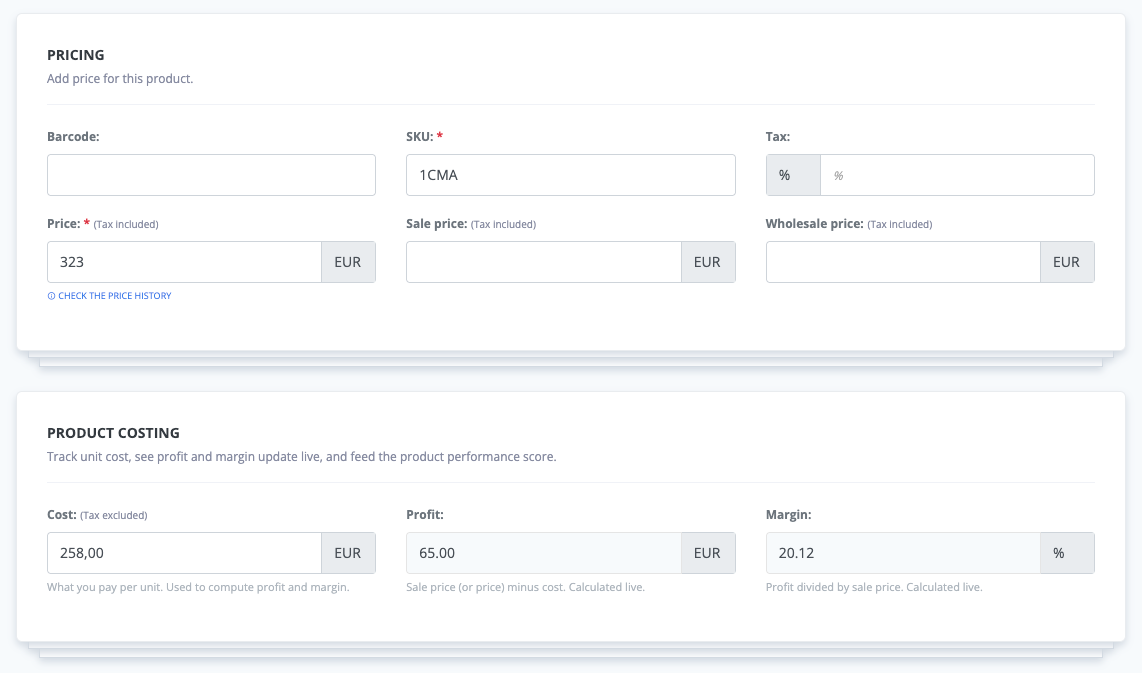
The plugin compares the entered product cost with the following ReadyCMS price fields:
pricesale pricewholesale price
For every available price, the plugin calculates both the expected profit amount and the corresponding profit margin percentage. These values are recalculated automatically whenever the product cost or any supported price changes.
Guide
- Open the Plugins page in your ReadyCMS Admin.
- Find Product costing and activate the plugin.
- Open an existing product or create a new one.
- Enter the unit cost in the product costing field.
- Review the calculated profit and margin for each configured price.
- Save the product.
Once enabled, product cost values are also included in standard product exports. They can also be used by compatible inventory reports, dashboard widgets, and the Product Performance Score plugin.
FAQ
1) Does Product costing change my product prices?
No. The plugin only reads your existing retail, sale, and wholesale prices. It does not automatically modify any product price.
2) Which prices are included in the calculations?
The plugin calculates profitability using the standard price, sale price and wholesale price fields whenever those prices are available.
3) What does the plugin calculate?
For each supported price, the plugin calculates:
- The expected absolute profit
- The profit margin percentage
4) Can I export product costs in bulk?
Yes. Standard product exports include cost data for both products and variants.
Bulk cost imports are not currently available through the ReadyCMS Admin.
5) Can cost information be used in reports?
Yes. Product cost data can be used in compatible inventory and performance reports, as well as standard product exports.
6) Does the plugin require an external accounting or analytics service?
No. Product costs and profitability data remain stored directly in your ReadyCMS database.
7) Is the plugin difficult to configure?
No. Activate the plugin, open a product, and enter its unit cost. The plugin then displays the calculated profit and margin automatically.
Build more with ReadyCMS
Explore the full plugin marketplace or book a demo to see them in action.