

Dashboard widgets for ReadyCMS
Adds a configurable widget grid to the ReadyCMS admin dashboard, giving admins a quick overview of key operational, ecommerce, security, content, and plugin health signals from one place.
Dashboard widgets for ReadyCMS admin
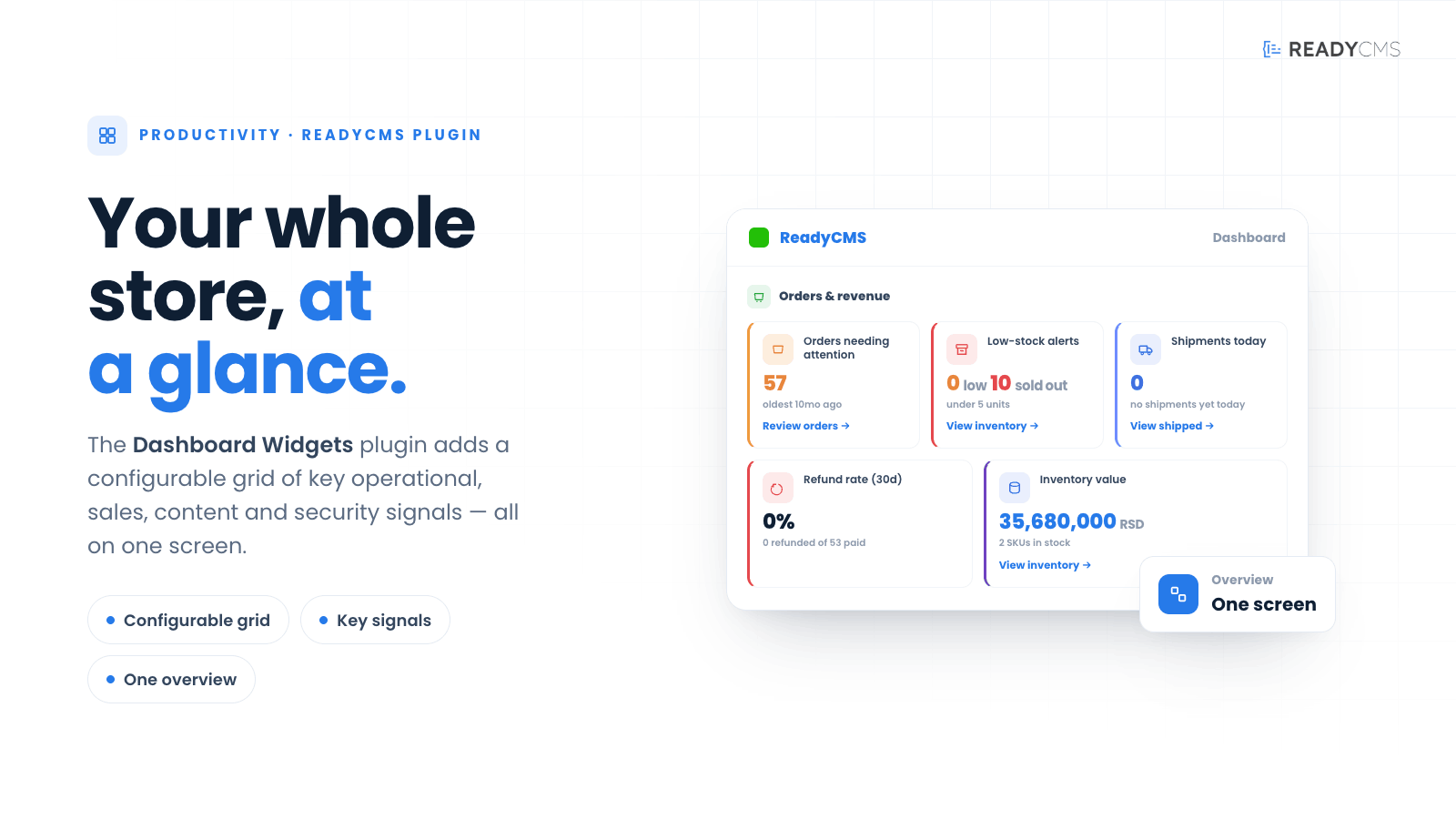
The Dashboard widgets plugin brings a full operational overview back to the ReadyCMS admin dashboard by adding a configurable grid of at-a-glance widgets.
Instead of showing only the default welcome card, the dashboard serves as a useful control center where administrators can quickly review important signals across store, system, security, content, and plugin. Each widget appears as a compact card that highlights items needing attention, including low-stock products, pending orders, failed background tasks, plugin health, abandoned carts, login anomalies, and revenue insights.
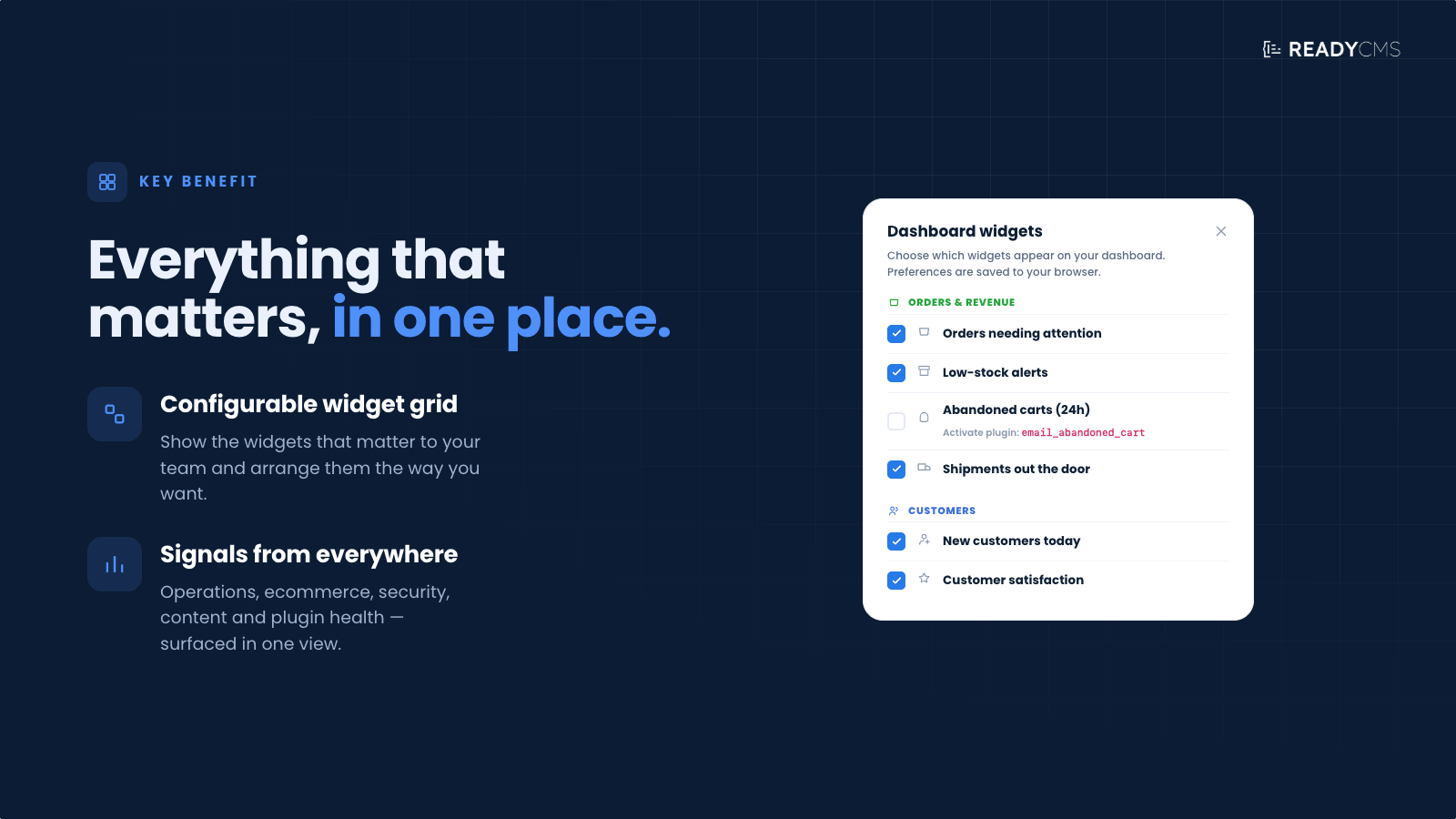
A gear-icon button in the dashboard top bar lets each admin choose which widgets they want to see. This keeps the dashboard flexible, clean, and relevant for different roles and workflows.
Key benefits
- Custom dashboard overview: Admins can personalize the dashboard by enabling or disabling individual widgets from a simple selection modal.
- Faster access to important signals: The widget grid helps teams notice operational issues earlier, including orders needing attention, low-stock alerts, abandoned carts, failed tasks, and plugin health warnings.
- E-commerce-aware reporting: Widgets connected to orders, revenue, abandoned carts, products, and countries are shown only when e-commerce is enabled or display an appropriate empty state when e-commerce data is unavailable.
- Plugin-aware widgets: Some widgets depend on other ReadyCMS plugins. For example, login anomaly data, abandoned cart notifications, two-factor authentication coverage, or email campaign data only appear when the related plugin is active.
- Role-aware visibility: Certain widgets can be limited to admin-tier users, so sensitive information is shown only to users with the appropriate access level.
- Per-admin preferences: Each admin can hide the widgets they do not need. These preferences are stored client-side, so the dashboard remains personalized even after the plugin is temporarily deactivated and reactivated.
- Cleaner daily workflow: The dashboard becomes more useful without becoming overwhelming. Admins can keep only the widgets that matter to their role, tenant, or daily responsibilities.
How it works
The Dashboard widgets plugin is designed to be simple for administrators. Once the plugin is active, the admin dashboard includes a widget grid and a gear icon control to choose which widgets are visible.
Guide (how to enable/disable widgets)
- Open the main ReadyCMS admin dashboard.
- Go to the plugin page and activate the Dashboard widgets.
- GO back to the main dashboard and click the grid icon in the top-right area of the dashboard.
- The widget selection modal will open.
- Choose which widgets to enable or disable.
- Close the modal to continue using the dashboard.
Disabled widgets are hidden from your dashboard view, but this does not deactivate the underlying plugin, module, or system process connected to that widget.
Widget visibilities
Not every widget is shown in every tenant or for every admin. Dashboard Widgets checks the current system setup before rendering each card.
Types of widgets
- Operational widgets: Orders needing attention, Low-stock alerts, Abandoned carts from the last 24 hours, Failed background tasks, Plugin health, Pending user approvals
- Security widgets: Recent failed logins, Two-factor authentication coverage, API key usage, Login anomalies
- Sales widgets: E-commerce snapshot, Monthly revenue chart, Top products, Top countries
- Content widgets: Latest posts, Changelog, Media compression report, Broken images
- Assistant widget: Contextual nudges based on live signals from other dashboard widgets
Plugin-aware widgets
Some widgets require another plugin to be active before they can display live data.
For example:
- Login anomaly widgets require the related login anomaly plugin.
- Abandoned cart widgets require the abandoned cart notification plugin.
- Two-factor authentication coverage requires the 2FA feature/plugin to be active.
- Email-related widgets require the relevant email or campaign plugin.
If the required plugin is not active, the widget may not appear or may show a “Plugin required” state.
E-commerce-aware widgets
Widgets related to orders, revenue, products, countries, and abandoned carts require e-commerce to be enabled.
If e-commerce is disabled in tenant settings, those widgets will not show live e-commerce data and may display an empty state.
Role-aware widgets
Some widgets are intended only for higher-level administrators. If a widget requires a higher role than the current user has, it will not be shown.
FAQ
Q1: What does the Dashboard Widgets plugin do?
A1: The plugin adds a configurable widget grid to the ReadyCMS admin dashboard. It helps administrators quickly review important operational, e-commerce, security, content, and plugin-related information from one place.
Q2: What happens if the plugin is not active?
A2: Without the Dashboard Widgets plugin active, the dashboard renders only the default welcome card. Activating the plugin restores the full operational widget view.
Q3: I deactivated the plugin, and my dashboard only shows the welcome card. Did I lose my preferences?
A3: No. Per-widget preferences are stored in a browser cookie called rcms_dashboard_widgets_off, not in the database. When you reactivate the plugin, your previous widget selection is restored automatically.
Q4: Why don’t I see the e-commerce widgets?
A4: Widgets that depend on e-commerce data, such as orders, revenue, abandoned carts, top products, and top countries, require e-commerce to be enabled in tenant settings. Enable e-commerce under Settings → E-commerce to see live data in those cards.
Q5: A widget says “Plugin required”. What does that mean?
A5: Some widgets show data from another ReadyCMS plugin. For example, recent failed logins may require the Login Anomaly Detector plugin, while abandoned cart data may require the Email Abandoned Cart Notification plugin. Activate the required plugin, and the widget will display its data.
Q6: Can each admin have a different dashboard setup?
A6: Yes. Each admin can choose which widgets they want to hide or display. Preferences are stored client-side, so the dashboard can be personalized per admin and browser.
Q7: Does hiding a widget deactivate the related feature?
A7: No. Hiding a widget only removes the card from your dashboard view. It does not deactivate e-commerce, security features, background tasks, notifications, or any underlying plugins associated with that widget.
Q8: Why do some widgets show an empty state?
A8: A widget may show an empty state when there is no available data, when the related module is disabled, when the required plugin is not active, or when the current admin does not have the necessary role to view that information.
Q9: Can I restore all widgets after hiding them?
A9: Yes. Open the widget selection modal from the gear-icon button and enable the widgets again. If needed, clearing the rcms_dashboard_widgets_off browser cookie will also reset hidden widget preferences.
Q10: Does this plugin affect the frontend website?
A10: No. Dashboard Widgets is an admin-only plugin. It changes the ReadyCMS admin dashboard experience but does not affect the frontend website, customer-facing pages, checkout, or public content.
Build more with ReadyCMS
Explore the full plugin marketplace or book a demo to see them in action.