
Admin active-time tracker
Track how much time your administrators spend working in the backend with the ReadyCMS Admin active-time tracker plugin. Get clear, visual insights into weekly activity per user and optimize team performance.


Admin active-time tracker plugin for ReadyCMS
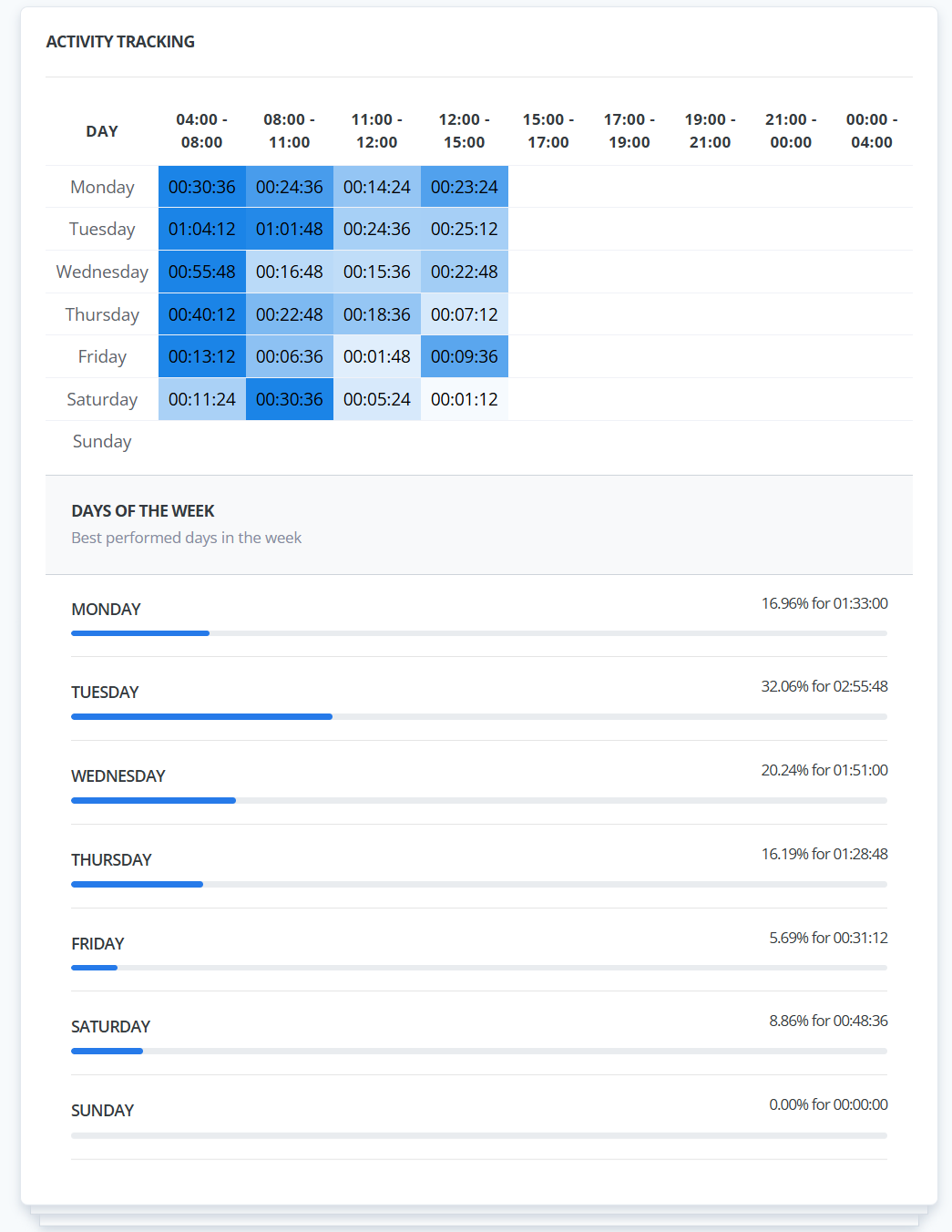
The Admin active-time tracker is a plugin that provides a visual overview of each administrator's time spent actively working in the backend. Once enabled, a new widget appears on every admin user's profile, showing a detailed weekly timetable of active hours along with daily totals and percentages.
This plugin helps team leads and business owners better understand when admins are most active, how consistently they engage with the system, and where time is spent across the week. It's ideal for planning internal workflows, optimizing shifts, or simply staying informed about backend usage patterns.
Key benefits & features
- Visual time insights: Clearly see how much time each admin user spends in ReadyCMS throughout the week.
- Hourly breakdown: Displays how much time was spent per time block, across each day of the week.
- Daily & weekly insights: See which days had the highest activity and productivity.
- Improve internal planning: Use active-time data to optimize schedules, shift assignments, and project handoffs.
- Performance transparency: See how consistently your team is present and engaged in the CMS.
How it works
Once you activate the Admin activity tracker plugin, ReadyCMS begins tracking all active admin sessions.
Activity is logged only when there's interaction (idle tabs or open windows without input aren't counted). Each session is divided into hourly blocks, with cumulative time shown per day.
The Activity tracking widget visualizes data and appears on each user's profile page.
Guide
- Activate the plugin on the Plugins page.
- Navigate to Admin > Users and open any user profile.
- A new Activity Tracker widget will appear, displaying:
- Weekly time blocks split into daily intervals.
- Daily totals in hours/minutes and percentage of overall activity.
- Use this data to understand usage behavior and support better team planning.
You'll instantly see detailed time reports for that user, like in the screenshot above.
Activities in ReadyCMS
While the Admin active-time tracker shows how long someone was active, the Activities plugin shows what they did.
The Activities plugin provides detailed insight into actions taken across your ReadyCMS instance. You can view:
- Which admin made a change
- What was changed (content, settings, etc)
- When it happened
You can also filter by administrator to isolate specific activity logs. Unlike the Admin active-time tracker (which appears only on user profile pages), the Activities plugin has a dedicated page where you can browse and search all logs in one place.
FAQ
Q1: Where can I see the time data for each admin?
A: After activating the plugin, go to the admin user's profile. The Active-Time Tracker widget appears directly on their page.
Q2: What time intervals does it track?
A: The plugin splits each day into fixed time blocks (e.g., 04:00–08:00, 08:00–11:00, etc.) and logs active minutes per block. It also totals each day's activity.
Q3: Does this plugin track specific actions?
A: No, it only tracks active time spent in the admin panel. To see specific actions (what changes were made, by whom, and when), use the Activities plugin.
Q4: Can I filter or search activity time across all users?
A: No, this plugin is designed per user. To review an admin's active time, visit their profile page. Use the Activities plugin to filter user actions globally.
Q5: Will this affect performance?
A: Not at all. It's lightweight and runs in the background, only adding a visual display to admin profile pages.
Build more with ReadyCMS
Explore the full plugin marketplace or book a demo to see them in action.